
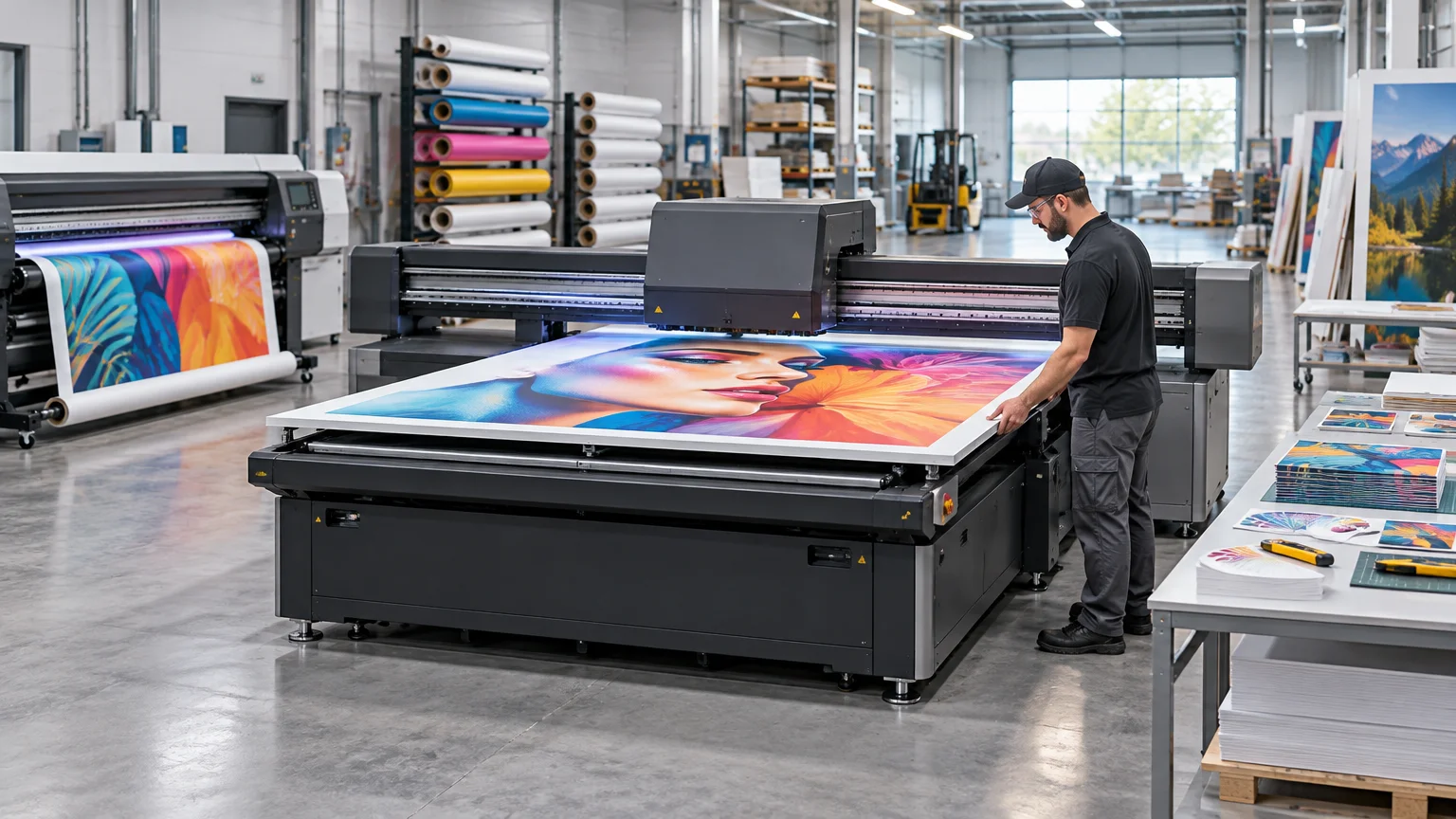
Wide format printing is digital printing built to produce graphics on large rolls or sheets of material. It covers work such as banners, signs, posters, window graphics, wallcoverings, vehicle graphics, floor graphics, decals, backlit displays, and point-of-purchase displays. The production system generally combines a digital front end, a roll-fed or flatbed print engine, ink, and a compatible substrate. PRINTING United’s wide-format system framework treats those components as one system rather than judging the printer in isolation.
There is no universal width at which ordinary printing officially becomes “wide format.” Wide format and large format are overlapping trade terms, and manufacturers apply them to different equipment classes. Media handling, ink technology, substrate compatibility, and intended application tell you more than the label on the brochure.
How wide format printing differs from conventional printing
The obvious difference is physical scale, but that is not the operational difference that matters most. Wide-format production must move, support, print, cure, cut, and sometimes install materials that may be flexible, rigid, heavy, delicate, or difficult to keep flat.
A commercial sheetfed press is designed around standardized sheets and repeatable paper handling. A wide-format roll printer may feed adhesive vinyl, mesh, canvas, paper, or banner material through a winding system. A flatbed printer may hold a rigid board in place with vacuum while a carriage prints directly onto its surface. Those are different production problems even when both machines use digital imaging.
Current 64-inch roll-fed printers illustrate a common equipment class. Epson specifies its 64-inch SureColor S7170 for applications including signs, banners, stickers, vehicle wraps, vinyl, mesh, paper, and canvas. HP’s Latex 630 print-and-cut configuration accepts rolls from 18 to 64 inches wide. These specifications describe media capacity, not a universal definition of wide format.
The three main equipment configurations
| Configuration | Best suited to | Typical production concern |
|---|---|---|
| Roll-to-roll | Flexible media supplied on rolls, including vinyl, banner material, paper, canvas, and some textiles | Media tracking, take-up, curing or drying, lamination, and cutting |
| Flatbed | Rigid sheets and boards placed directly on a print bed | Loading, alignment, vacuum control, unloading, and board staging |
| Hybrid | A combination of roll-fed work, flexible sheets, and rigid substrates | Changeovers, material handling, and balancing flexibility against production speed |
Roll-to-roll equipment is the familiar choice for flexible sign and display media. The material unwinds, passes through the print zone, and may be collected by a take-up reel. It is a natural fit for banners, self-adhesive graphics, posters, and similar applications.
Flatbeds address a different job mix. Mimaki’s JFX220-2515, for example, accepts media up to approximately 98.4 by 76 inches and up to four inches thick. That capacity makes direct-to-board production possible on materials that cannot simply be fed from a roll. The substrate decision still matters: the practical differences among foam board, PVC, aluminum composite material, and corrugated plastic affect fabrication, installation, shipping, and cost. Our guide to rigid board printing examines those trade-offs.
Hybrid printers are designed to handle both roll material and rigid or flexible sheets. That versatility can broaden a shop’s application range, but the word “hybrid” does not eliminate handling work. EFI offers systems ranging from manual loading to configurations with automated alignment and stacker or unloader options, which demonstrates how substantially workflow can vary within the same broad equipment category.
Ink technology determines what the press can realistically produce
A printer’s width is only one buying criterion. Ink chemistry affects media compatibility, finish, durability, flexibility, curing, handling time, ventilation requirements, and downstream finishing. Common routes include solvent or eco-solvent, water-based latex, UV or LED-UV, and dye sublimation. The FESPA overview of wide-format ink choices is a useful starting point for comparing these technologies.
Solvent and eco-solvent
Solvent and eco-solvent systems remain relevant for flexible sign graphics, including self-adhesive vinyl, banners, stickers, and vehicle graphics. Shops evaluating this route need to consider the complete workflow around drying, handling, lamination, cutting, and the selected media—not merely the printer’s headline resolution.
Latex
HP describes its Latex process as water-based ink chemistry used with heat and airflow for drying and curing. According to HP, output is dry and ready for use after curing. That can simplify some downstream handling, but the heat requirements, electrical service, media behavior, and printer footprint still belong in the production calculation.
UV and LED-UV
UV inks cure under ultraviolet light and are widely used in flatbed and hybrid systems for printing directly on rigid substrates. That does not mean every UV ink adheres equally well to every board or bends safely around every shape. Adhesion and flexibility depend on the ink-and-material combination, so testing is part of responsible production planning.
Dye sublimation
Dye-sublimation equipment is commonly associated with textile and fabric graphics. Wide-format systems in this class use roll media and may include heaters, high-capacity roll handling, and automatic take-up. The complete process can also involve transfer or fixation steps depending on the equipment and substrate.
What a wide-format workflow actually includes
Sending a file to the printer is only one stage. A practical workflow may include preflight, color management, nesting, RIP processing, printing, curing or drying, contour cutting, trimming, laminating, mounting, sewing, packing, and installation preparation.
The RIP, or raster image processor, interprets incoming files and controls how jobs move to the press. It can manage queues, media profiles, color settings, nesting, and other production functions. PRINTING United’s RIP resource guide explains why the digital front end is a core production component rather than an optional file-opening utility.
File preparation still determines whether the system receives usable artwork. Scale, image resolution, bleed, cut paths, color setup, fonts, and transparency handling can all affect production. The basic checks in our print-ready file guide are relevant before a large graphic starts consuming expensive media.
Print-and-cut packages can automate some contour-cutting work, but they do not remove every finishing step. Depending on the product, output may still require trimming, lamination, mounting, sewing, or preparation for installation. Stickers and labels sold by CustomStickers illustrate the kind of finished product a buyer sees; the storefront alone does not reveal the printing, cutting, inspection, and packing work behind a particular order.
Why advertised speed is not shop throughput
Printer speed is usually presented under defined print modes, pass counts, resolutions, or quality settings. That number is not the same as completed sellable output per hour. Epson notes that throughput varies with factors including workstation configuration, file size, resolution, ink coverage, and networking. HP publishes different Latex 630 speeds for different print modes and pass counts.
The shop-level calculation must also include loading, test prints, color approval, curing, unloading, lamination, cutting, rework, packing, and operator attention. A fast engine paired with a slow cutter or manual board-loading process can simply move the bottleneck downstream.
Rigid work makes that point particularly clear. An operator may need to stage boards, confirm alignment, set vacuum zones, load the bed, unload the print, and move the sheet into cutting or fabrication. Automation can reduce some of that labor, but it has to match the job mix and volume closely enough to justify its cost.
What to evaluate before buying wide-format equipment
Start with the products and substrates you intend to sell, not with the machine that has the most impressive demonstration. A useful equipment review should answer these questions:
- Will the shop print flexible rolls, rigid boards, textiles, or a mix?
- Which ink technology matches the required media, finish, flexibility, durability, and turnaround time?
- What print modes deliver acceptable quality on the actual applications—not just the highest advertised speed?
- How will jobs be cut, laminated, mounted, sewn, packed, or prepared for installation?
- Does the RIP support the shop’s file intake, color-management, nesting, and queue requirements?
- What floor space is required for the printer, cutter, loading area, board staging, media storage, and service access?
- What electrical service, ventilation, heat management, and environmental controls does the system require?
- Can operators test the intended media and profiles before the shop commits to a large material purchase?
- Where will the bottleneck move when print capacity increases?
Installation planning deserves particular attention. HP’s documentation for the Latex 630 print-and-cut solution specifies separate printer and cutter footprints, roll limits, two printer power cords, and 200–240 V electrical service. Requirements differ by model, but the broader lesson is consistent: budget for a production cell, not just a box with a purchase price.
The practical definition
Wide format printing is best understood as a production system for making large graphics on flexible or rigid media. The press width matters, but the useful questions are what the system can feed, which inks it uses, how output is finished, and how many acceptable jobs the shop can complete.
For buyers, the next step is to build a representative job list and test it on the proposed equipment using the actual media, print modes, RIP settings, and finishing route. That exercise exposes the real labor, quality, handling, and throughput constraints. A width specification tells you whether material may fit. It does not tell you whether the work will be profitable.
Frequently Asked Questions
What is wide format printing?
Wide format printing is digital production for large graphics on flexible rolls or rigid sheets. The system typically combines a digital front end, a roll-fed or flatbed print engine, ink, and a compatible substrate.
What size counts as wide format printing?
There is no universal width cutoff. “Wide format” and “large format” overlap, so media handling, ink technology, substrate compatibility, and intended applications are more useful distinctions than the label.
What is the difference between roll-to-roll, flatbed, and hybrid printers?
Roll-to-roll printers handle flexible media supplied on rolls. Flatbeds print directly on rigid sheets or boards, while hybrid systems can handle roll material and rigid or flexible sheets.
Which inks are used in wide format printing?
Common options include solvent or eco-solvent, water-based latex, UV or LED-UV, and dye sublimation. The choice affects compatible media, finish, durability, flexibility, curing, handling, and downstream finishing.
Why is advertised printer speed different from actual throughput?
Published speed reflects defined print modes and settings, not completed sellable work. Real throughput also depends on file processing, loading, curing or drying, cutting, lamination, packing, rework, and operator attention.
What should a shop evaluate before buying wide-format equipment?
Start with the intended products and substrates, then assess ink, print quality, RIP support, finishing, floor space, electrical service, ventilation, media storage, and labor. Test representative jobs through the complete workflow; a width specification alone does not establish quality, throughput, or profitability.
References
- Wide Format System Certification
- Applications Produced
- Print Primer: Printing Terms & Vocabulary
- SureColor P9570 44" Wide-Format Inkjet Printer | Products | Epson US
- SureColor S7170 64-Inch Solvent Printer | Products | Epson US
- HP Latex 630 W Print and Cut Plus Solution | |
- "LOCKS IN PLACE, LASTING EFFECT.": Launching the "JFX220-2515" Large-Format Flatbed UV Printer, Featuring Further Advances in Productivity and Expressive Capabilities | Product | News | MIMAKI
- EFI Pro 16h+ Wide Format Printer
- EFI VUTEk Q3h XP Production Hybrid LED UV Printer
- EFI Hybrid Flatbed/Roll-fed LED Printers
- Choosing the right ink for wide format printing – FESPA
- HP Latex Large-Format Printing – HP Latex Printing Technology | HP® Official Site
- User's Guide – Epson SureColor F7170
- RIP Resource Guide
- SureColor S40600 Print Cut Edition | Products | Epson US